Build your own NFL statistics tracker in Google Sheets.
Copy the script, follow the screenshots, and pull recent team and player performance into a spreadsheet you control.
What you get
- Last 5 completed games for any two NFL teams, regular season or playoffs
- Passing, rushing, and receiving stats: Yards, TDs, Completions, Carries, Receptions, Targets, Rush + Rec Yards
- Defense and kicking too: Tackles, Sacks, Kicking Points
- Organized by metric (like a sportsbook), not by player
- Last 5 Average and Last 5 Median columns for quick reference
- Season rankings out of 32 teams for points and yards, on offense and defense
- W/L result and score for each game
- A Phone layout that fits an iPhone screen, with a checkbox to refresh from the Google Sheets app
Step-by-step setup
- 1
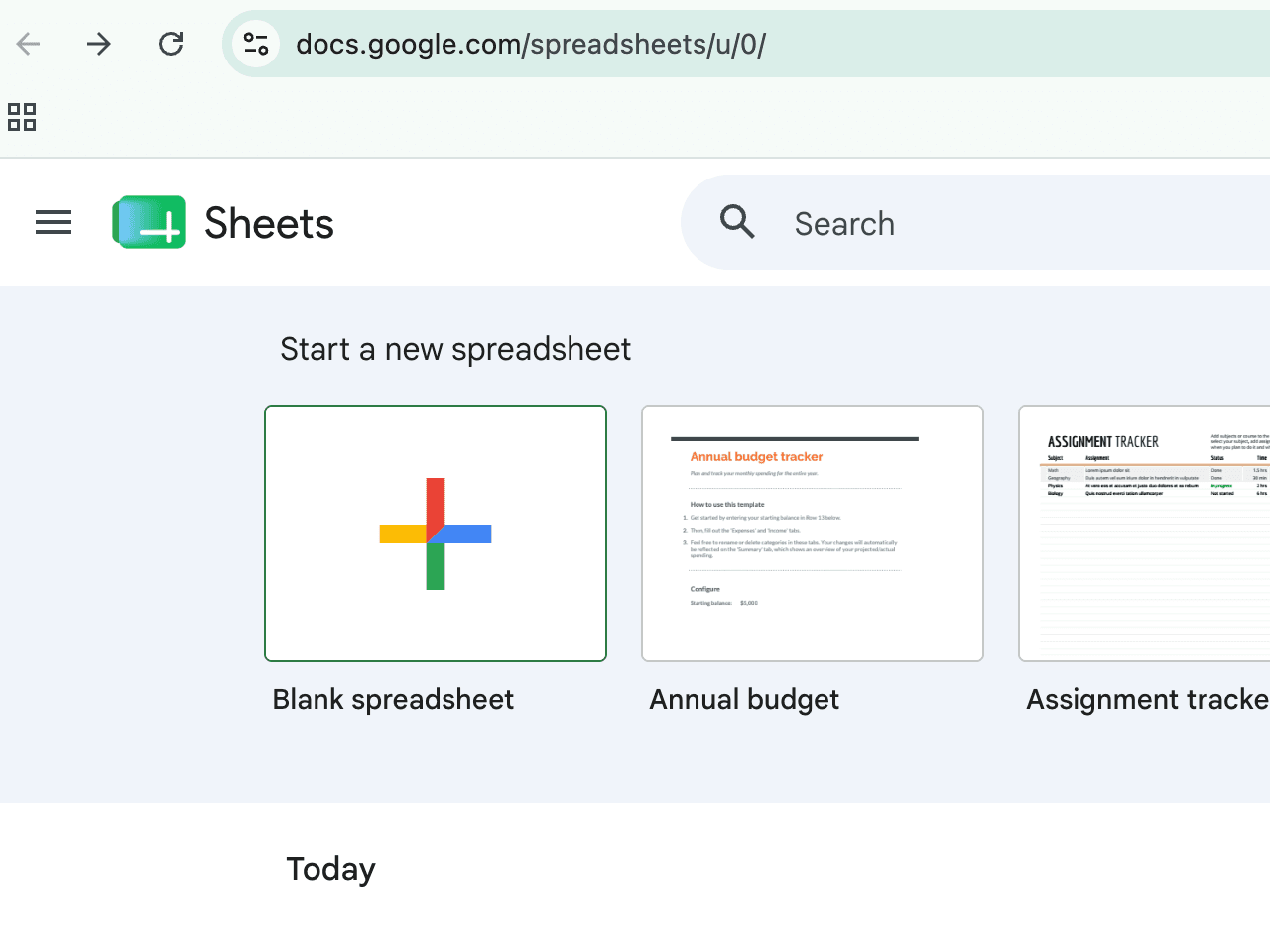
Open Google Sheets and create a new spreadsheet
Go to sheets.google.com and click the "+" button to start a blank spreadsheet. Give it any name, "NFL Tracker" works well.
- 2
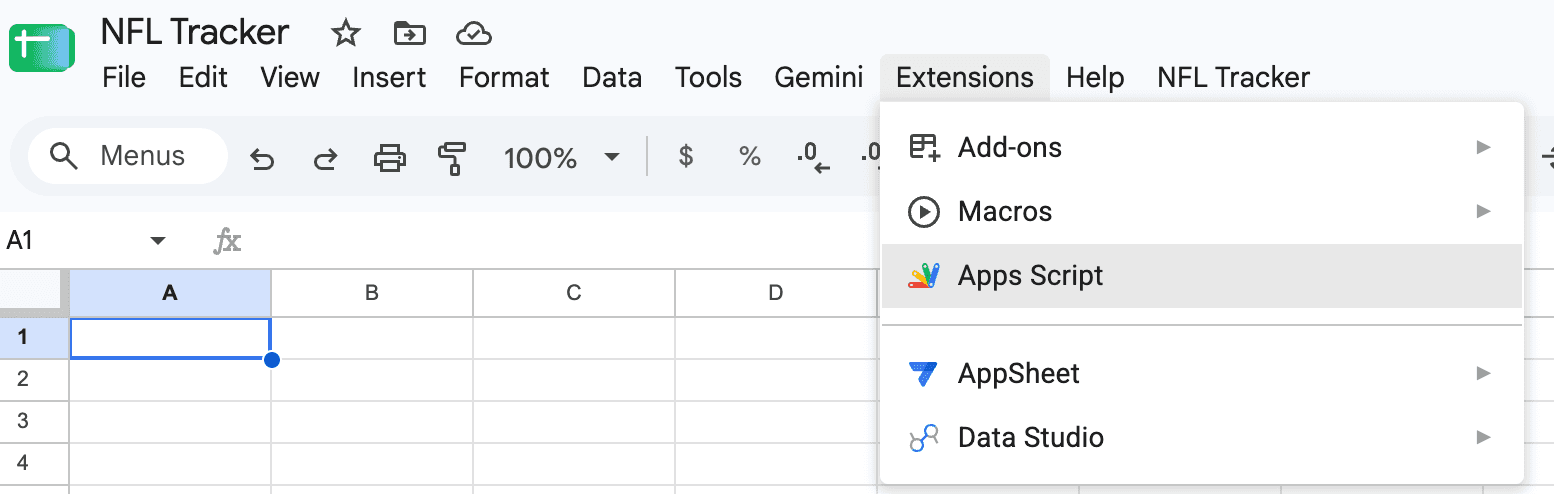
Open Apps Script
In the menu bar, click Extensions → Apps Script. A new tab will open with the script editor.
- 3
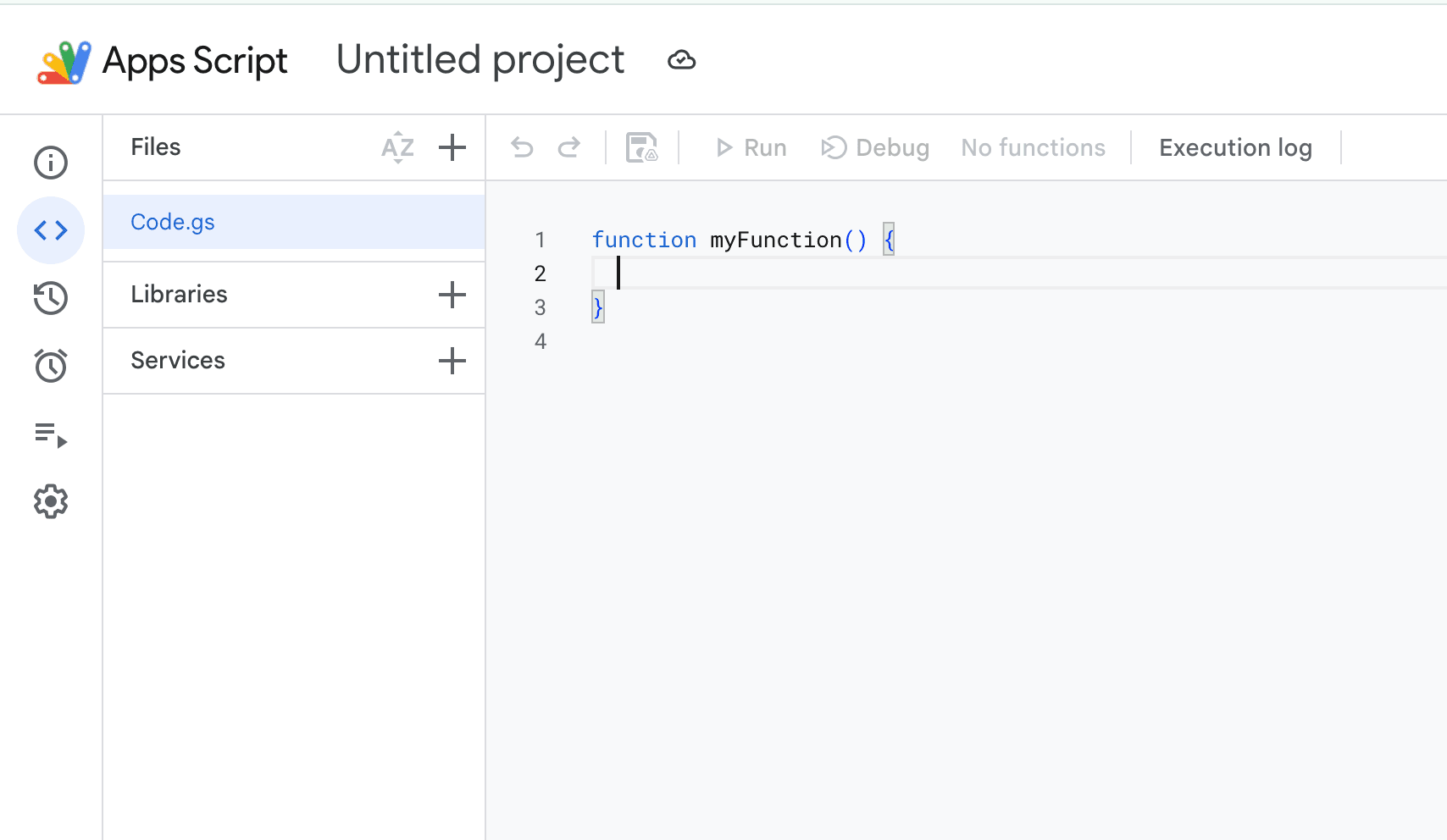
Copy the script
Click "Copy script to clipboard" below. You'll paste it into the editor in the next step.
Google Apps Script
nfl-form-tracker.gs
/**
 * ─────────────────────────────────────────────────────────────
 *  NFL FORM TRACKER · any two teams
 *  www.codingfortherestofus.com
 *
 *  1. Run setup()  → builds Setup tab with team dropdowns
 *  2. Pick two teams
 *  3. NFL Tracker menu → Run Statistics
 *
 *  The season is detected automatically from ESPN, so this keeps
 *  working year to year with no edits.
 * ─────────────────────────────────────────────────────────────
 */

const CFG = {
  api:    "https://site.web.api.espn.com/apis/site/v2/sports/football/nfl",
  site:   "https://www.codingfortherestofus.com",
  games:  5,                // how many recent games to show
  tz:     "America/New_York",
  font:   "Arial",
  size:   10,
  ink:    "#111111",
  muted:  "#666666",
  paper:  "#ffffff",
  faint:  "#f2f2f2",
  tint:   "#e8f0ff",        // Avg / Median columns
  line:   "#e5e5e5",
  up:     "#0a7d33",
  down:   "#b3261e",
  brand:  "#0366ff",        // www.codingfortherestofus.com brand color
};

// Sections appear on the team sheet in this order.
// Each row: [our key, section title, ESPN box score category, ESPN stat key]
// A section only lists players who showed up in that category in at least
// one of the games shown (so Passing Yards lists QBs, Tackles lists defenders).
const STATS = [
  ["passYds", "Passing Yards",       "passing",       "passingYards"],
  ["passTd",  "Passing TDs",         "passing",       "passingTouchdowns"],
  ["cmp",     "Completions",         "passing",       "completions/passingAttempts"],
  ["intThr",  "Interceptions Thrown","passing",       "interceptions"],
  ["rushYds", "Rushing Yards",       "rushing",       "rushingYards"],
  ["car",     "Carries",             "rushing",       "rushingAttempts"],
  ["rushTd",  "Rushing TDs",         "rushing",       "rushingTouchdowns"],
  ["rec",     "Receptions",          "receiving",     "receptions"],
  ["recYds",  "Receiving Yards",     "receiving",     "receivingYards"],
  ["tgt",     "Targets",             "receiving",     "receivingTargets"],
  ["recTd",   "Receiving TDs",       "receiving",     "receivingTouchdowns"],
  ["scrYds",  "Rush + Rec Yards",    null,            null],   // worked out in parseGame
  ["tkl",     "Tackles",             "defensive",     "totalTackles"],
  ["sacks",   "Sacks",               "defensive",     "sacks"],
  ["kPts",    "Kicking Points",      "kicking",       "totalKickingPoints"],
];

// ESPN season types: 2 = regular season, 3 = playoffs.
const SEASON_TYPES = [2, 3];

// Season rankings block at the top of each team sheet.
// Each row: [label, short label for the Phone layout, ESPN stat category, ESPN stat name]
// Ranks are worked out here from all 32 teams, because ESPN's own
// ranks are missing for offense and backwards for pass defense.
// 1st = most gained on offense, fewest allowed on defense.
const RANKINGS = [
  ["Points / game",      "Points",     "scoring", "totalPointsPerGame"],
  ["Total yards / game", "Total yds",  "passing", "yardsPerGame"],
  ["Pass yards / game",  "Pass yds",   "passing", "netPassingYardsPerGame"],
  ["Rush yards / game",  "Rush yds",   "rushing", "rushingYardsPerGame"],
];

// Setup tab cells
const CELL = {
  teamA:   "B4",
  teamB:   "B5",
  layout:  "B6",   // "Computer" or "Phone"
  refresh: "B7",   // checkbox: tick it to refresh (works in the iPhone app)
  status:  "A9",   // last refreshed / error message
};

// ── menu ─────────────────────────────────────────────────────

function onOpen() {
  SpreadsheetApp.getUi().createMenu("NFL Tracker")
    .addItem("Setup (run once)", "setup")
    .addSeparator()
    .addItem("Run Statistics", "refresh")
    .addSeparator()
    .addItem("Delete all team sheets", "deleteTeamSheets")
    .addToUi();
}

function deleteTeamSheets() {
  const ss       = SpreadsheetApp.getActiveSpreadsheet();
  const ui       = SpreadsheetApp.getUi();
  const skip     = new Set(["Setup", "_teams"]);
  const toDelete = ss.getSheets().filter(s => !skip.has(s.getName()));

  if (!toDelete.length) {
    ui.alert("No team sheets to delete.");
    return;
  }

  const confirm = ui.alert(
    "Delete team sheets",
    `This will permanently delete ${toDelete.length} sheet(s):\n${toDelete.map(s => s.getName()).join(", ")}\n\nContinue?`,
    ui.ButtonSet.YES_NO
  );
  if (confirm !== ui.Button.YES) return;

  toDelete.forEach(s => ss.deleteSheet(s));
  ss.toast(`Deleted ${toDelete.length} team sheet(s).`, "Done", 4);
}

// ── setup ────────────────────────────────────────────────────

function setup() {
  const teams = fetchTeams();
  const ss    = SpreadsheetApp.getActiveSpreadsheet();
  const s     = ss.getSheetByName("Setup") || ss.insertSheet("Setup", 0);
  s.clear(); s.clearFormats();
  s.getRange("A1:B32").setFontFamily(CFG.font).setFontSize(CFG.size).setFontColor(CFG.ink);

  // Title header
  s.getRange("A1:B1").merge()
    .setBackground(CFG.brand).setFontColor(CFG.paper)
    .setFontWeight("bold").setFontSize(13)
    .setHorizontalAlignment("center");
  s.getRange("A1").setValue("NFL FORM TRACKER");

  // Watermark row
  s.getRange("A2:B2").merge()
    .setFontColor(CFG.muted).setFontSize(8)
    .setHorizontalAlignment("center").setFontStyle("italic");
  s.getRange("A2").setValue("www.codingfortherestofus.com");

  s.getRange("A4:A7").setValues([["Team A"], ["Team B"], ["Layout"], ["Refresh now"]]).setFontWeight("bold");
  s.getRange("A8:B8").merge();
  s.getRange("A8").setValue("Pick two teams and a layout, then tick Refresh now (or NFL Tracker menu → Run Statistics).")
    .setFontColor(CFG.muted).setFontStyle("italic").setFontSize(9);
  s.getRange("A9:B9").merge();
  s.getRange(CELL.status).setFontSize(9).setFontColor(CFG.muted);

  const teamRule = SpreadsheetApp.newDataValidation()
    .requireValueInList(teams.map(t => t.name), true).setAllowInvalid(false).build();
  const layoutRule = SpreadsheetApp.newDataValidation()
    .requireValueInList(["Computer", "Phone"], true).setAllowInvalid(false).build();

  s.getRange(CELL.teamA).setDataValidation(teamRule).setBackground(CFG.faint).setValue("Kansas City Chiefs");
  s.getRange(CELL.teamB).setDataValidation(teamRule).setBackground(CFG.faint).setValue("Philadelphia Eagles");
  s.getRange(CELL.layout).setDataValidation(layoutRule).setBackground(CFG.faint).setValue("Computer");
  s.getRange(CELL.refresh).insertCheckboxes().setValue(false);

  // The iPhone app does not show custom menus, so ticking the Refresh
  // checkbox runs refresh() instead. This needs an "installable" trigger
  // (a plain onEdit() is not allowed to fetch from ESPN).
  const hasTrigger = ScriptApp.getProjectTriggers().some(t => t.getHandlerFunction() === "onSetupEdit");
  if (!hasTrigger) ScriptApp.newTrigger("onSetupEdit").forSpreadsheet(ss).onEdit().create();

  // ── Troubleshooting section ───────────────────────────────
  s.getRange("A11:B11").merge()
    .setBackground(CFG.brand).setFontColor(CFG.paper)
    .setFontWeight("bold").setHorizontalAlignment("left");
  s.getRange("A11").setValue("TROUBLESHOOTING");

  const issues = [
    ['"Run Setup first" error',        'Open NFL Tracker → Setup (run once) before running statistics.'],
    ['"Unknown team" error',           'Re-run Setup. The team name must match the dropdown exactly.'],
    ['"No completed games" error',     'The ESPN API may be temporarily down. Wait a minute and try again.'],
    ['Sheet shows fewer than 5 games', 'Early in the season a team may have played fewer than 5 games. Only completed games are shown.'],
    ['Scores show 0–0',                'ESPN returned the game before it was fully final. Refresh again in a few minutes.'],
    ['Script times out',               'A full run usually takes under a minute. If it times out, run Statistics again. It re-fetches everything.'],
    ['Stats showing "–" for a player', 'The player did not record that stat in that game (did not play, or no carries, catches, or tackles). Avg and Median only count games with a number.'],
    ['How Season Rankings work',       'Out of 32 teams, regular season to date. 1st is best: most gained on offense, fewest allowed on defense. Early in the season they move around a lot.'],
    ['No NFL Tracker menu on iPhone',  'The Google Sheets app does not show custom menus. Tick Refresh now instead. Run Setup once on a computer first.'],
    ['Phone layout',                   'Fits an iPhone screen so you only scroll up and down: shorter names, Avg only (no Median).'],
  ];

  issues.forEach(([q, a], i) => {
    const qRow = 12 + i * 2;
    s.getRange(qRow, 1, 1, 2).setValues([[q, ""]])
      .setFontWeight("bold").setFontSize(9).setBackground(CFG.faint);
    s.getRange(qRow, 1).setFontColor(CFG.brand);
    s.getRange(qRow + 1, 1, 1, 2).setValues([[a, ""]])
      .setFontSize(9).setFontColor(CFG.muted).setWrap(true);
  });

  const stash = ss.getSheetByName("_teams") || ss.insertSheet("_teams");
  stash.clear();
  stash.getRange(1, 1, teams.length, 3).setValues(teams.map(t => [t.name, t.id, t.abbrev]));
  stash.hideSheet();

  s.setHiddenGridlines(true);
  s.setColumnWidth(1, 200);
  s.setColumnWidth(2, 380);
  s.setRowHeight(10, 12);
}

// Runs when the Setup tab is edited (installed by setup()).
// Only acts when the Refresh now checkbox is ticked.
function onSetupEdit(e) {
  const range = e.range;
  if (range.getSheet().getName() !== "Setup") return;
  if (range.getA1Notation() !== CELL.refresh || range.getValue() !== true) return;

  const status = range.getSheet().getRange(CELL.status);
  status.setValue("Refreshing... this takes about a minute.").setFontColor(CFG.muted);
  try {
    refresh();
  } catch (err) {
    status.setValue(`Error: ${err.message}`).setFontColor(CFG.down);
  } finally {
    range.setValue(false);
  }
}

// ── refresh ──────────────────────────────────────────────────

function refresh() {
  const ss         = SpreadsheetApp.getActiveSpreadsheet();
  const setupSheet = ss.getSheetByName("Setup");
  const stash      = ss.getSheetByName("_teams");
  if (!setupSheet || !stash) throw new Error("Run Setup first (NFL Tracker menu).");

  const lookup = {};
  stash.getDataRange().getValues().forEach(r => {
    lookup[r[0]] = { id: String(r[1]), abbrev: r[2] };
  });

  const season = currentSeason();
  ss.toast(`Fetching the ${season} season...`, "NFL Tracker", 30);

  const ranks  = fetchRankings(Object.values(lookup).map(t => t.id), season);
  const render = setupSheet.getRange(CELL.layout).getValue() === "Phone" ? renderPhone : renderForm;

  [CELL.teamA, CELL.teamB].forEach(cell => {
    const name = setupSheet.getRange(cell).getValue();
    const team = lookup[name];
    if (!team) throw new Error(`Unknown team: "${name}". Re-run Setup.`);
    const games = fetchGameLog(team, season);
    if (!games.length) throw new Error(`No completed games found for ${name}.`);
    render(name, games, ranks?.[team.id]);
  });

  const updated = Utilities.formatDate(new Date(), CFG.tz, "MMM d, h:mm a");
  setupSheet.getRange(CELL.status).setValue(`Last refreshed ${updated}`).setFontColor(CFG.muted);
  ss.toast(`Last updated: ${updated}`, "Refreshed", 5);
}

// ── data ─────────────────────────────────────────────────────

function fetchTeams() {
  const data = get(`${CFG.api}/teams?limit=32`);
  if (!data) throw new Error("Could not reach ESPN. Wait a minute and try again.");
  return data.sports[0].leagues[0].teams
    .map(t => ({ name: t.team.displayName, id: String(t.team.id), abbrev: t.team.abbreviation }))
    .sort((a, b) => a.name.localeCompare(b.name));
}

/**
 * The season ESPN is currently in, labeled by its STARTING year
 * (the 2026 season runs Sept 2026 to Feb 2027). Asks ESPN first; if
 * that fails, works it out from today's date (seasons start in September,
 * so January and February still belong to last year's season).
 */
function currentSeason() {
  const year = get(`${CFG.api}/scoreboard`)?.leagues?.[0]?.season?.year;
  if (year) return Number(year);
  const now = new Date();
  return now.getMonth() >= 8 ? now.getFullYear() : now.getFullYear() - 1;
}

/**
 * The last CFG.games completed games for a team, oldest first.
 * If the current season has no completed games yet (e.g. preseason),
 * falls back to the previous season.
 */
function fetchGameLog(team, season) {
  for (const year of [season, season - 1]) {
    const byId = new Map();
    SEASON_TYPES.forEach(type => {
      const data = get(`${CFG.api}/teams/${team.id}/schedule?season=${year}&seasontype=${type}`);
      completedEvents(data).forEach(e => byId.set(e.id, e));
    });

    const events = [...byId.values()].sort((a, b) => new Date(a.date) - new Date(b.date));
    Logger.log(`${team.abbrev} ${year}: ${events.length} completed games.`);
    if (events.length) {
      return events.slice(-CFG.games).map(e => parseGame(e, team)).filter(Boolean);
    }
  }
  return [];
}

/**
 * Season rankings for every team, worked out from all 32 teams' stats.
 * Returns { teamId: [{ label, short, off, offRank, def, defRank }, ...] },
 * one entry per RANKINGS row, or null if ESPN could not be reached.
 * Before Week 1 nobody has played, so it falls back to last season.
 */
function fetchRankings(teamIds, season) {
  for (const year of [season, season - 1]) {
    const requests  = teamIds.map(id => ({
      url: `${CFG.api}/teams/${id}/statistics?season=${year}`,
      muteHttpExceptions: true,
    }));
    const responses = UrlFetchApp.fetchAll(requests);   // all 32 at once

    // stats[id] = { off: [...one number per RANKINGS row], def: [...] }
    const stats = {};
    responses.forEach((res, i) => {
      if (res.getResponseCode() !== 200) return;
      const r = JSON.parse(res.getContentText()).results;
      if (!statValue(r?.stats?.categories, "general", "gamesPlayed")) return;
      stats[teamIds[i]] = {
        off: RANKINGS.map(([, , cat, name]) => statValue(r.stats.categories, cat, name)),
        def: RANKINGS.map(([, , cat, name]) => statValue(r.opponent, cat, name)),
      };
    });

    const all = Object.values(stats);
    Logger.log(`Rankings ${year}: ${all.length} teams with games played.`);
    if (!all.length) continue;

    // Rank = 1 + how many teams did better. Ties share a rank.
    const result = {};
    Object.entries(stats).forEach(([id, s]) => {
      result[id] = RANKINGS.map(([label, short], i) => ({
        label,
        short,
        off:     s.off[i],
        offRank: 1 + all.filter(o => o.off[i] > s.off[i]).length,   // more gained is better
        def:     s.def[i],
        defRank: 1 + all.filter(o => o.def[i] < s.def[i]).length,   // less allowed is better
      }));
    });
    return result;
  }
  return null;
}

// One number from ESPN's team stats: categories → stats → value.
function statValue(categories, category, name) {
  const cat = (categories || []).find(c => c.name === category);
  return cat?.stats?.find(s => s.name === name)?.value ?? 0;
}

function completedEvents(data) {
  return (data?.events || []).filter(e => {
    const status = e.competitions?.[0]?.status?.type;
    return status?.completed === true || status?.state === "post";
  });
}

function parseGame(event, team) {
  Utilities.sleep(350);   // be polite to ESPN between box score requests
  const box = get(`${CFG.api}/summary?event=${event.id}`);
  const isUs = t => String(t?.id) === team.id || t?.abbreviation === team.abbrev;

  const us = box?.boxscore?.players?.find(p => isUs(p.team));
  if (!us?.statistics?.length) return null;

  const comp = event.competitions[0];
  const side = comp.competitors.find(c => isUs(c.team));
  const opp  = comp.competitors.find(c => !isUs(c.team));

  const usScore  = scoreOf(side);
  const oppScore = scoreOf(opp);

  // players[name] = { passYds: 249, passTd: 3, ... } with only the stats
  // that player recorded in this game. A missing key shows as "–".
  const players = {};
  us.statistics.forEach(category => {
    const wanted = STATS.filter(([, , cat]) => cat === category.name);
    if (!wanted.length) return;

    (category.athletes || []).forEach(a => {
      const name = a.athlete.displayName;
      const line = players[name] || (players[name] = {});
      wanted.forEach(([key, , , espnKey]) => {
        const i = category.keys.indexOf(espnKey);
        if (i >= 0) line[key] = toNumber(a.stats[i]);
      });
    });
  });

  // Rush + Rec Yards: anyone who ran or caught the ball.
  Object.values(players).forEach(p => {
    if (p.rushYds !== undefined || p.recYds !== undefined) {
      p.scrYds = (p.rushYds || 0) + (p.recYds || 0);
    }
  });

  const result = usScore > oppScore ? "W" : usScore < oppScore ? "L" : "T";

  return {
    date:   Utilities.formatDate(new Date(event.date), CFG.tz, "M/d"),
    opp:    (side?.homeAway === "home" ? "vs " : "@ ") + (opp?.team?.abbreviation || "?"),
    result,
    score:  `${usScore}–${oppScore}`,
    players,
  };
}

// ESPN sometimes sends a score as "31" and sometimes as { value: 31 }.
function scoreOf(competitor) {
  const raw = competitor?.score;
  return parseInt(typeof raw === "object" ? raw?.value : raw, 10) || 0;
}

// ── render ────────────────────────────────────────────────────

function renderForm(teamName, games, rankings) {
  const sheet  = blankSheet(teamName);
  const recent = [...games].reverse();   // newest on the left
  const gc     = recent.length;
  const w      = gc + 3;                 // name + games + avg + median
  const avgCol = w - 1;
  const now    = Utilities.formatDate(new Date(), CFG.tz, "MMM d 'at' h:mm a");
  const pad    = n => Array(n).fill("");
  const resultColor = { W: CFG.up, L: CFG.down, T: CFG.muted };

  // Build every row in memory, then write the whole sheet in one call.
  const rows = [
    [teamName.toUpperCase(), `Last ${gc} games  ·  Updated ${now}`, ...pad(w - 2)],
    ["Date",     ...recent.map(g => g.date), `Last ${gc} Avg.`, `Last ${gc} Median`],
    ["Opponent", ...recent.map(g => g.opp), "", ""],
    ["Result",   ...recent.map(g => `${g.result} ${g.score}`), "", ""],
  ];
  const sectionRows = [];
  const rankCells   = [];   // [row, col, rank] so we can color them below

  // Season rankings: "25.3 (10th)" under Offense and Defense.
  if (rankings) {
    sectionRows.push(rows.length + 1);
    rows.push(["SEASON RANKINGS", "Offense", "Defense", ...pad(w - 3)]);
    rankings.forEach(r => {
      const row = rows.length + 1;
      rankCells.push([row, 2, r.offRank], [row, 3, r.defRank]);
      rows.push([
        "  " + r.label,
        `${round1(r.off)} (${ordinal(r.offRank)})`,
        `${round1(r.def)} (${ordinal(r.defRank)})`,
        ...pad(w - 3),
      ]);
    });
  }
  const playerStart = rows.length + 1;   // first row of the player sections

  STATS.forEach(([key, label]) => {
    const order = playerOrder(games, key);
    if (!order.length) return;   // skip a section nobody recorded

    sectionRows.push(rows.length + 1);
    rows.push([label.toUpperCase(), ...pad(w - 1)]);

    order.forEach(name => {
      const values = recent.map(g => g.players[name]?.[key]);
      const played = values.filter(v => v !== undefined);
      rows.push([
        "  " + name,
        ...values.map(v => (v === undefined ? "–" : v)),
        round1(avg(played)),
        round1(median(played)),
      ]);
    });
  });

  const last = rows.length;
  const body = last - 4;   // rows below the frozen header

  // Base style for everything
  sheet.getRange(1, 1, last, w).setValues(rows)
    .setFontFamily(CFG.font).setFontSize(CFG.size).setFontColor(CFG.ink)
    .setVerticalAlignment("middle");
  sheet.getRange(2, 2, last - 1, w - 1).setHorizontalAlignment("center");

  // Player rows: light dividers, bold shaded Avg / Median columns
  if (body > 0) {
    sheet.getRange(5, 1, body, w)
      .setBorder(null, null, null, null, null, true, CFG.line, SpreadsheetApp.BorderStyle.SOLID);
  }
  if (last >= playerStart) {
    sheet.getRange(playerStart, avgCol, last - playerStart + 1, 2)
      .setBackground(CFG.tint).setFontWeight("bold").setNumberFormat("0.0");
  }

  // Rankings: top 10 green, bottom 10 red, the middle stays black.
  rankCells.forEach(([r, c, rank]) => {
    const color = rank <= 10 ? CFG.up : rank >= 23 ? CFG.down : CFG.ink;
    sheet.getRange(r, c).setFontColor(color).setFontWeight("bold");
  });

  // Row 1: title bar
  sheet.getRange(1, 1, 1, w).setBackground(CFG.brand).setFontColor(CFG.paper);
  sheet.getRange(1, 1).setFontWeight("bold").setFontSize(11);
  sheet.getRange(1, 2).setHorizontalAlignment("left");
  sheet.getRange(1, w).setHorizontalAlignment("right").setRichTextValue(
    SpreadsheetApp.newRichTextValue()
      .setText("codingfortherestofus.com")
      .setLinkUrl(CFG.site)
      .setTextStyle(SpreadsheetApp.newTextStyle()
        .setForegroundColor(CFG.paper).setUnderline(false).setItalic(true).setFontSize(8).build())
      .build()
  );

  // Rows 2-4: date / opponent / result
  sheet.getRange(2, 1, 3, w).setBackground(CFG.paper);
  sheet.getRange(2, 1, 3, 1).setFontColor(CFG.muted).setFontSize(9);
  sheet.getRange(2, 2, 1, w - 1).setFontWeight("bold");
  sheet.getRange(3, 2, 1, gc).setFontColor(CFG.muted);
  sheet.getRange(4, 2, 1, gc).setFontWeight("bold")
    .setFontColors([recent.map(g => resultColor[g.result])]);
  sheet.getRange(4, 1, 1, w)
    .setBorder(null, null, true, null, null, null, CFG.ink, SpreadsheetApp.BorderStyle.SOLID_MEDIUM);

  // Section bars (last, so they sit on top of the column shading)
  sectionRows.forEach(r => {
    sheet.getRange(r, 1, 1, w)
      .setBackground(CFG.brand).setFontColor(CFG.paper).setFontWeight("bold");
  });

  // Layout
  sheet.setFrozenRows(4);
  sheet.setFrozenColumns(1);
  sheet.setRowHeights(1, last, 24);
  sheet.setRowHeight(1, 30);
  sheet.setColumnWidth(1, 200);
  sheet.setColumnWidths(2, gc, 90);
  sheet.setColumnWidths(avgCol, 2, 115);
  sheet.setHiddenGridlines(true);
}

/**
 * Phone layout: everything fits the width of an iPhone screen so you
 * only scroll up and down. Same data as renderForm, but shorter names,
 * no Median column, and result and score on separate rows.
 * Column widths add up to about 350px (iPhone usable width is ~360).
 */
function renderPhone(teamName, games, rankings) {
  const sheet  = blankSheet(teamName);
  const recent = [...games].reverse();   // newest on the left
  const gc     = recent.length;
  const w      = gc + 2;                 // name + games + avg
  const now    = Utilities.formatDate(new Date(), CFG.tz, "MMM d, h:mm a");
  const pad    = n => Array(n).fill("");
  const resultColor = { W: CFG.up, L: CFG.down, T: CFG.muted };
  const HEADER = 5;                      // frozen rows at the top

  const rows = [
    [teamName.toUpperCase(), ...pad(w - 1)],
    ["Date",   ...recent.map(g => g.date), "Avg"],
    ["Opp",    ...recent.map(g => g.opp.replace("vs ", "").replace("@ ", "@")), ""],
    ["Result", ...recent.map(g => g.result), ""],
    ["Score",  ...recent.map(g => g.score), ""],
  ];
  const sectionRows = [];
  const rankCells   = [];

  // Season rankings: just the rank ("10th") under Off and Def.
  if (rankings) {
    sectionRows.push(rows.length + 1);
    rows.push(["SEASON RANKS", "Off", "Def", ...pad(w - 3)]);
    rankings.forEach(r => {
      const row = rows.length + 1;
      rankCells.push([row, 2, r.offRank], [row, 3, r.defRank]);
      rows.push(["  " + r.short, ordinal(r.offRank), ordinal(r.defRank), ...pad(w - 3)]);
    });
  }
  const playerStart = rows.length + 1;

  STATS.forEach(([key, label]) => {
    const order = playerOrder(games, key);
    if (!order.length) return;

    sectionRows.push(rows.length + 1);
    rows.push([label.toUpperCase(), ...pad(w - 1)]);

    order.forEach(name => {
      const values = recent.map(g => g.players[name]?.[key]);
      const played = values.filter(v => v !== undefined);
      rows.push([
        "  " + shortName(name),
        ...values.map(v => (v === undefined ? "–" : v)),
        round1(avg(played)),
      ]);
    });
  });

  const playerEnd = rows.length;
  rows.push([`Updated ${now}`, ...pad(w - 1)]);
  rows.push(["codingfortherestofus.com", ...pad(w - 1)]);
  const last = rows.length;

  // Base style
  sheet.getRange(1, 1, last, w).setValues(rows)
    .setFontFamily(CFG.font).setFontSize(9).setFontColor(CFG.ink)
    .setVerticalAlignment("middle");
  sheet.getRange(2, 2, playerEnd - 1, w - 1).setHorizontalAlignment("center");

  // Dividers, and the shaded Avg column on player rows
  sheet.getRange(HEADER + 1, 1, playerEnd - HEADER, w)
    .setBorder(null, null, null, null, null, true, CFG.line, SpreadsheetApp.BorderStyle.SOLID);
  if (playerEnd >= playerStart) {
    sheet.getRange(playerStart, w, playerEnd - playerStart + 1, 1)
      .setBackground(CFG.tint).setFontWeight("bold").setNumberFormat("0.0");
  }

  rankCells.forEach(([r, c, rank]) => {
    const color = rank <= 10 ? CFG.up : rank >= 23 ? CFG.down : CFG.ink;
    sheet.getRange(r, c).setFontColor(color).setFontWeight("bold");
  });

  // Row 1: title bar (the name spills across the empty cells to its right)
  sheet.getRange(1, 1, 1, w).setBackground(CFG.brand).setFontColor(CFG.paper);
  sheet.getRange(1, 1).setFontWeight("bold").setFontSize(11);

  // Rows 2-5: date / opponent / result / score
  sheet.getRange(2, 1, HEADER - 1, 1).setFontColor(CFG.muted);
  sheet.getRange(2, 2, 1, w - 1).setFontWeight("bold");
  sheet.getRange(3, 2, 1, gc).setFontColor(CFG.muted);
  sheet.getRange(4, 2, 1, gc).setFontWeight("bold")
    .setFontColors([recent.map(g => resultColor[g.result])]);
  sheet.getRange(5, 2, 1, gc).setFontSize(8).setFontColor(CFG.muted);
  sheet.getRange(HEADER, 1, 1, w)
    .setBorder(null, null, true, null, null, null, CFG.ink, SpreadsheetApp.BorderStyle.SOLID_MEDIUM);

  sectionRows.forEach(r => {
    sheet.getRange(r, 1, 1, w)
      .setBackground(CFG.brand).setFontColor(CFG.paper).setFontWeight("bold");
  });

  // Footer: updated time and site link
  sheet.getRange(playerEnd + 1, 1, 2, 1).setFontSize(8).setFontColor(CFG.muted).setFontStyle("italic");
  sheet.getRange(last, 1).setRichTextValue(
    SpreadsheetApp.newRichTextValue().setText("codingfortherestofus.com").setLinkUrl(CFG.site).build()
  );

  // Layout: freeze the header rows only. No frozen column, because the
  // whole sheet already fits the screen (and a frozen column would cut
  // off long names in the section bars). Hide unused columns so the
  // sheet cannot be dragged sideways.
  sheet.setFrozenRows(HEADER);
  sheet.setFrozenColumns(0);
  sheet.setRowHeights(1, last, 22);
  sheet.setRowHeight(1, 28);
  sheet.setColumnWidth(1, 104);
  sheet.setColumnWidths(2, gc, 40);
  sheet.setColumnWidth(w, 46);
  if (sheet.getMaxColumns() > w) sheet.hideColumns(w + 1, sheet.getMaxColumns() - w);
  sheet.setHiddenGridlines(true);
}

// ── helpers ───────────────────────────────────────────────────

// Clears a team sheet (or creates it). Also un-hides columns, in case
// the Phone layout hid some last time.
function blankSheet(name) {
  const ss = SpreadsheetApp.getActiveSpreadsheet();
  const s  = ss.getSheetByName(name) || ss.insertSheet(name);
  s.clear(); s.clearFormats();
  s.showColumns(1, s.getMaxColumns());
  return s;
}

// "Patrick Mahomes" → "P. Mahomes", "Kenneth Walker III" → "K. Walker III"
function shortName(name) {
  const [first, ...rest] = name.split(" ");
  return rest.length ? `${first[0]}. ${rest.join(" ")}` : name;
}

// Players with a number for this stat in any game shown, highest total first.
function playerOrder(games, key) {
  const totals = {};
  games.forEach(g => Object.entries(g.players).forEach(([name, p]) => {
    if (p[key] !== undefined) totals[name] = (totals[name] || 0) + p[key];
  }));
  return Object.keys(totals).sort((a, b) => totals[b] - totals[a] || a.localeCompare(b));
}

function get(url) {
  try {
    const res = UrlFetchApp.fetch(url, { muteHttpExceptions: true });
    if (res.getResponseCode() === 200) return JSON.parse(res.getContentText());
    Logger.log(`HTTP ${res.getResponseCode()} | ${url}`);
  } catch (e) {
    Logger.log(`${e} | ${url}`);
  }
  return null;
}

// "249" → 249, "1.5" → 1.5, "23/33" → 23 (the first number)
const toNumber = v => parseFloat(String(v).split("/")[0]) || 0;
const round1   = n => Math.round(n * 10) / 10;

// 1 → "1st", 2 → "2nd", 11 → "11th", 22 → "22nd"
function ordinal(n) {
  const s = ["th", "st", "nd", "rd"], v = n % 100;
  return n + (s[(v - 20) % 10] || s[v] || s[0]);
}
const avg      = a => a.reduce((s, v) => s + v, 0) / a.length;

function median(a) {
  const s = [...a].sort((x, y) => x - y);
  const m = Math.floor(s.length / 2);
  return s.length % 2 ? s[m] : (s[m - 1] + s[m]) / 2;
}
- 4
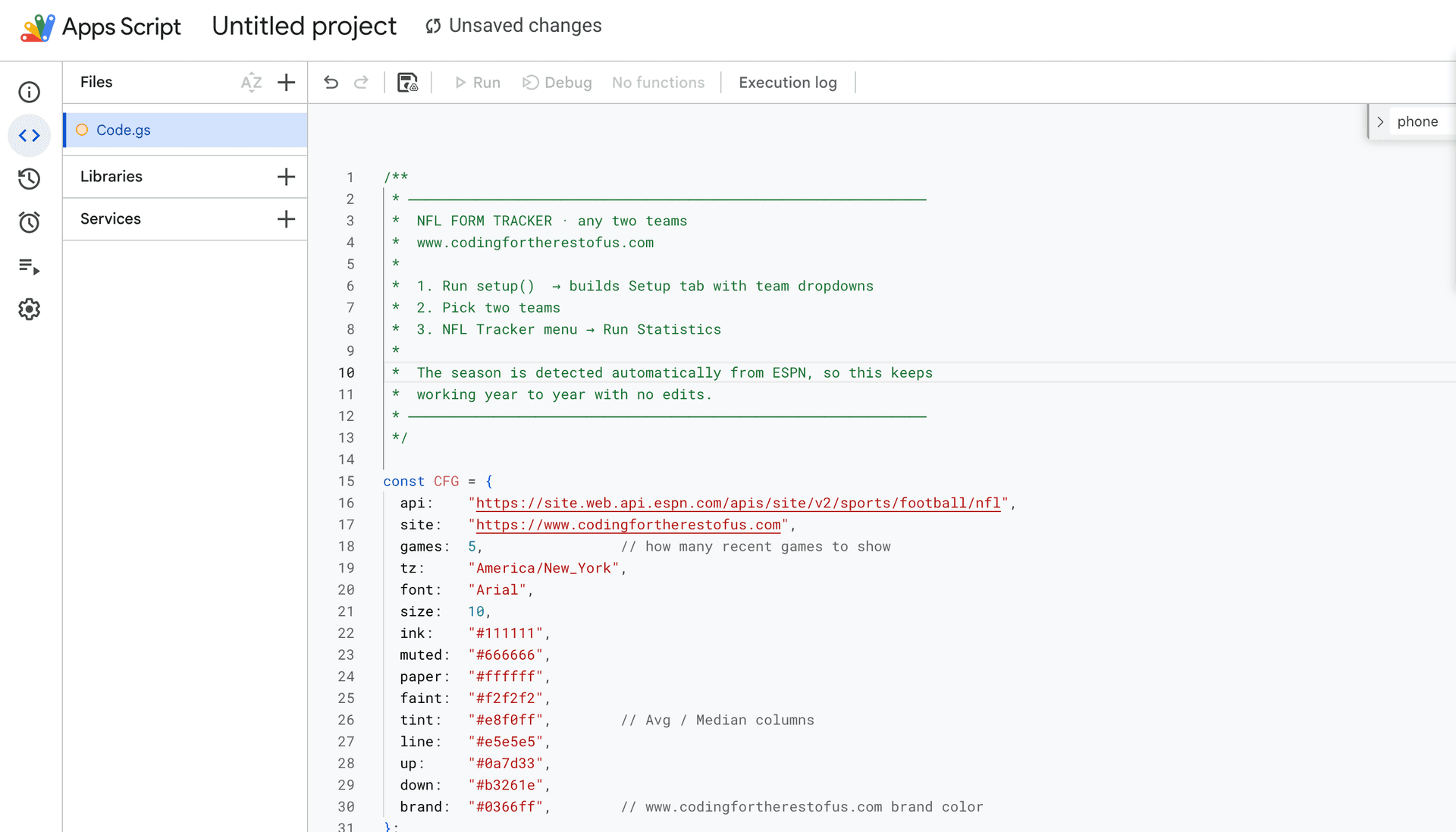
Clear the default code and paste
Select all the existing code in the editor (Cmd+A on Mac, Ctrl+A on Windows), delete it, then paste. You should see the full NFL Tracker script appear.
- 5
Save and name the project
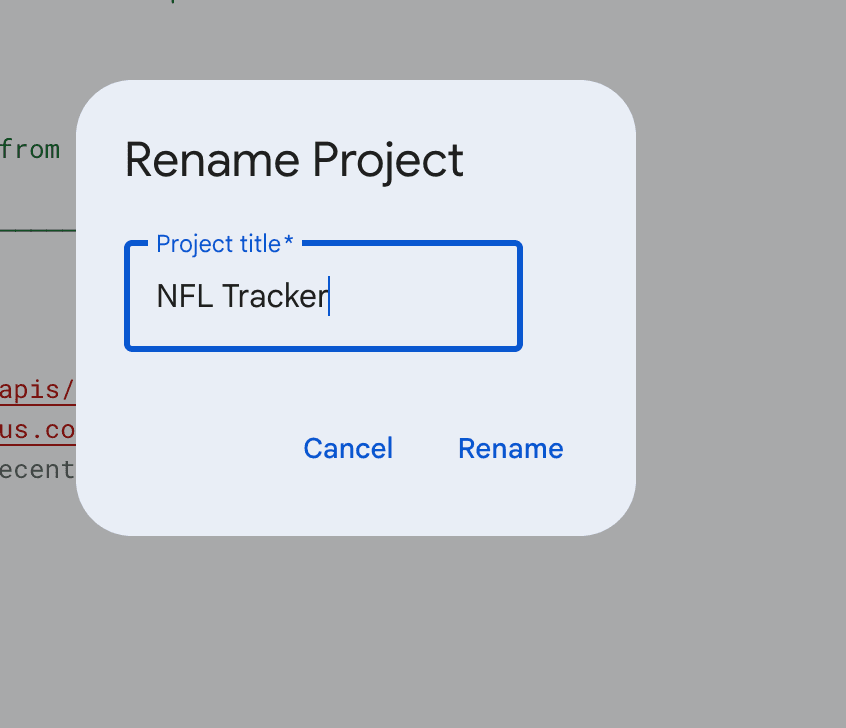
Click the save icon or press Cmd+S / Ctrl+S. A "Rename Project" dialog will appear, type "NFL Tracker" and click Rename.
- 6
Go back to your spreadsheet and run Setup
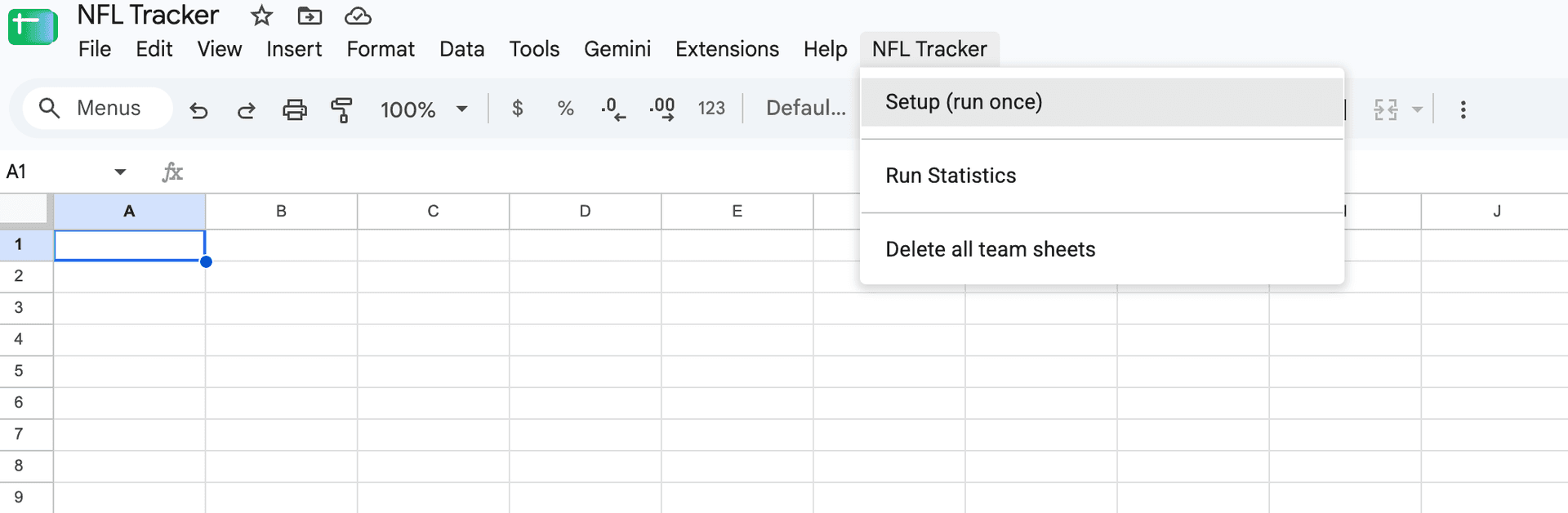
Switch back to your Google Sheets tab and refresh the page. A new "NFL Tracker" menu will appear. Click NFL Tracker → Setup (run once).
- 7
Click OK on the Authorization prompt
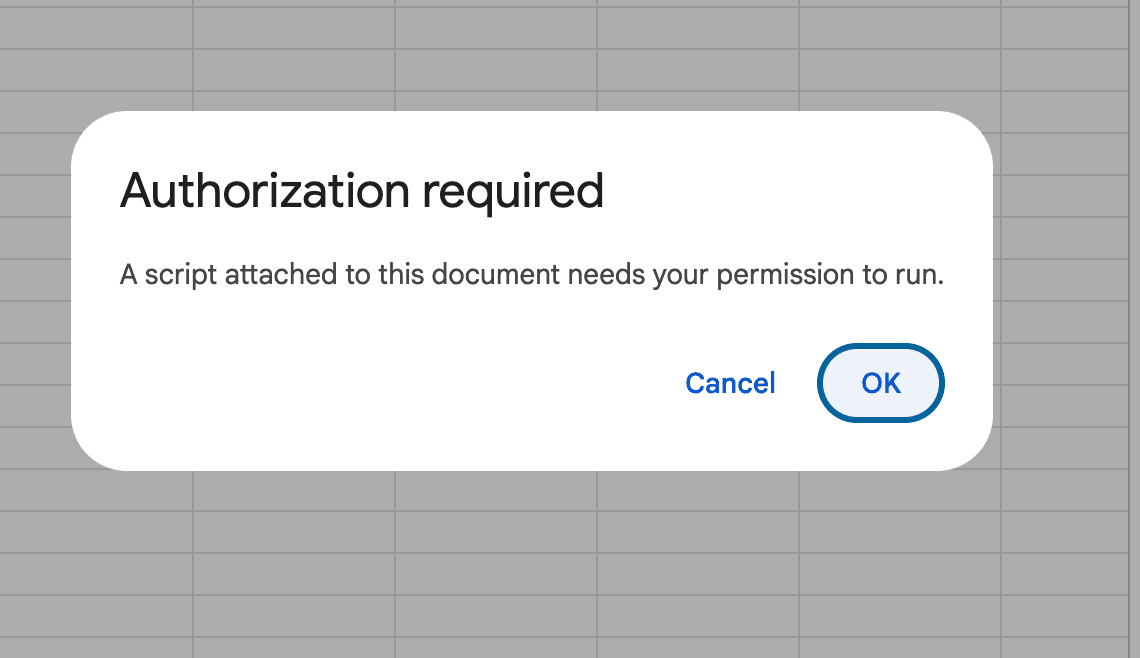
Google will show a popup saying "Authorization required: a script attached to this document needs your permission to run." Click OK to continue.
This happens the first time only. The script only talks to the ESPN API and the spreadsheet it lives in.
- 8
Proceed past the "Google hasn't verified this app" warning
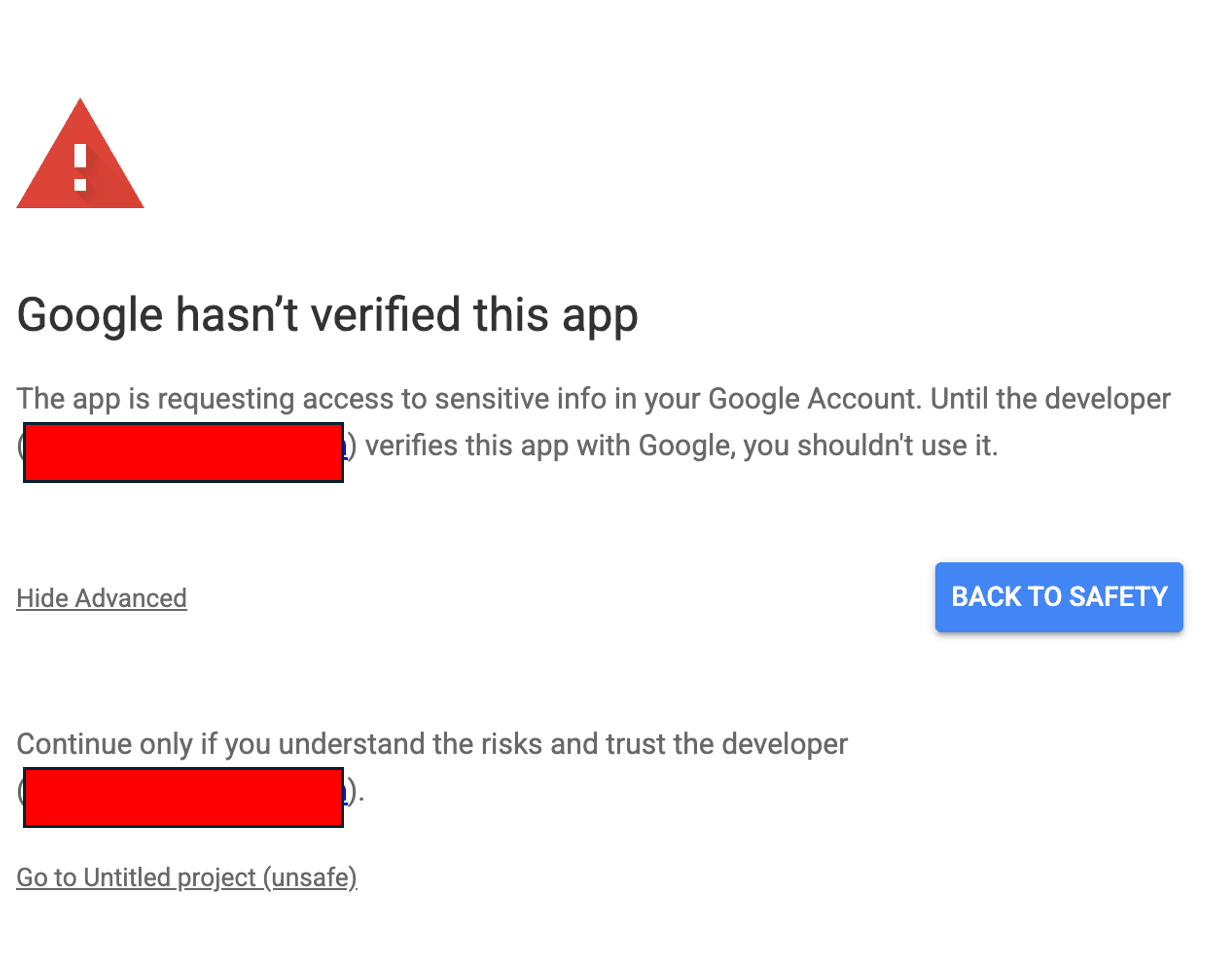
Google shows this warning for any personal script. Click "Advanced" at the bottom left to expand options, then click "Go to [project name] (unsafe)" that appears below it.
This is standard for self-written Apps Scripts. The script only fetches public ESPN data, nothing sensitive is accessed.
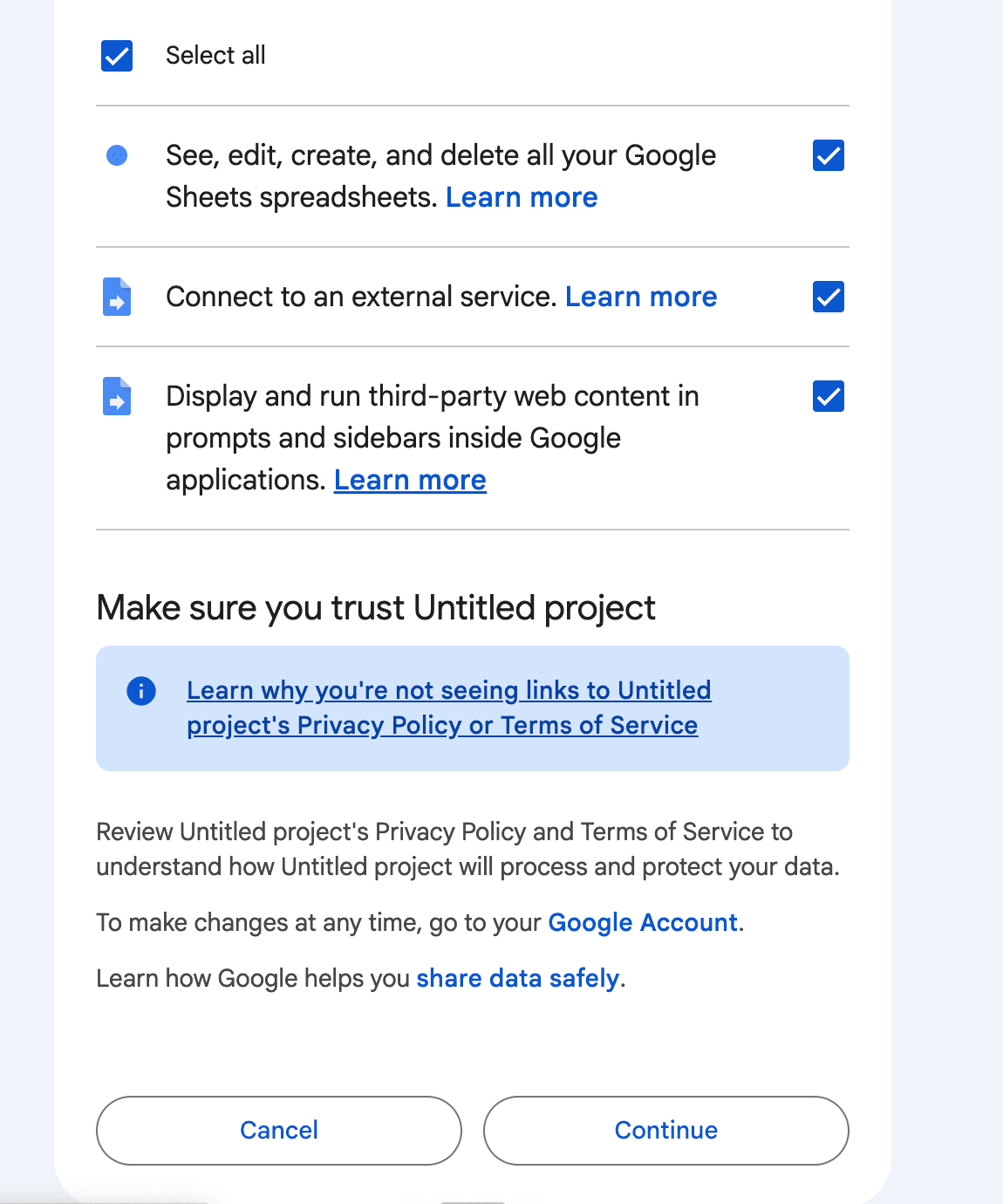
- 9
Review permissions and click Continue
Google will show the permissions the script needs. Click Continue to grant access. Setup will then run automatically. If the Setup tab does not appear afterwards, click NFL Tracker → Setup (run once) again.
- 10
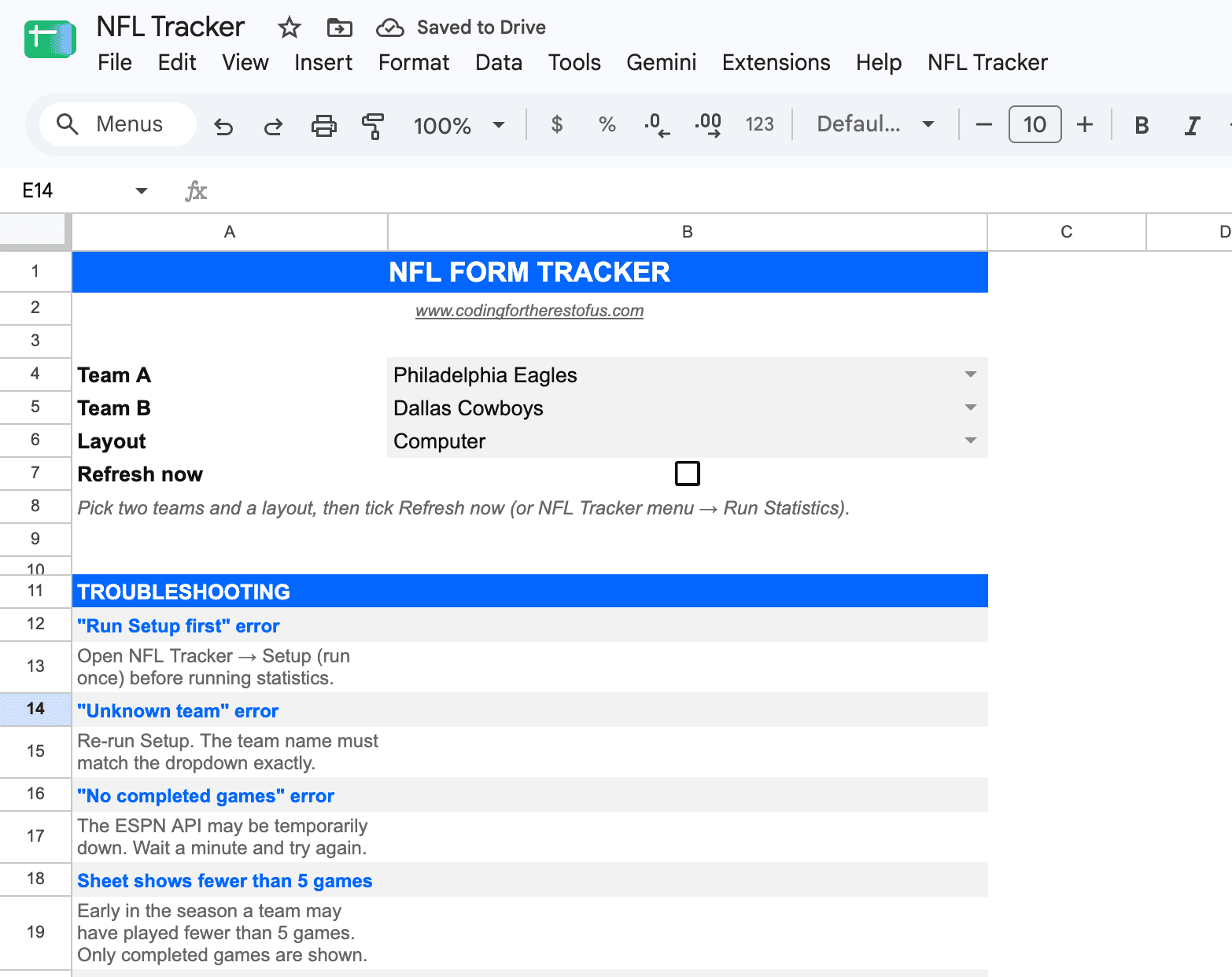
Pick your two teams
After Setup finishes, a Setup tab will appear in your spreadsheet. Use the dropdowns in rows 4 and 5 to pick Team A and Team B. All 32 NFL teams are available. Row 6 sets the layout: Computer or Phone.
- 11
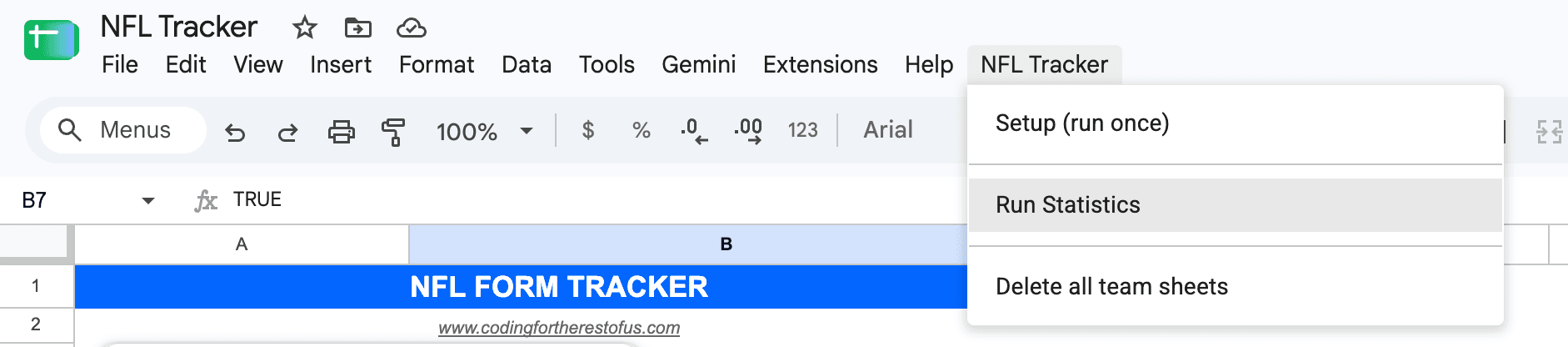
Run Statistics
Click NFL Tracker → Run Statistics, or tick the "Refresh now" checkbox on the Setup tab. The script fetches the last 5 completed games for each team from the ESPN API. This takes about a minute.
Don't close the tab while it runs, each game requires a separate API call.
- 12
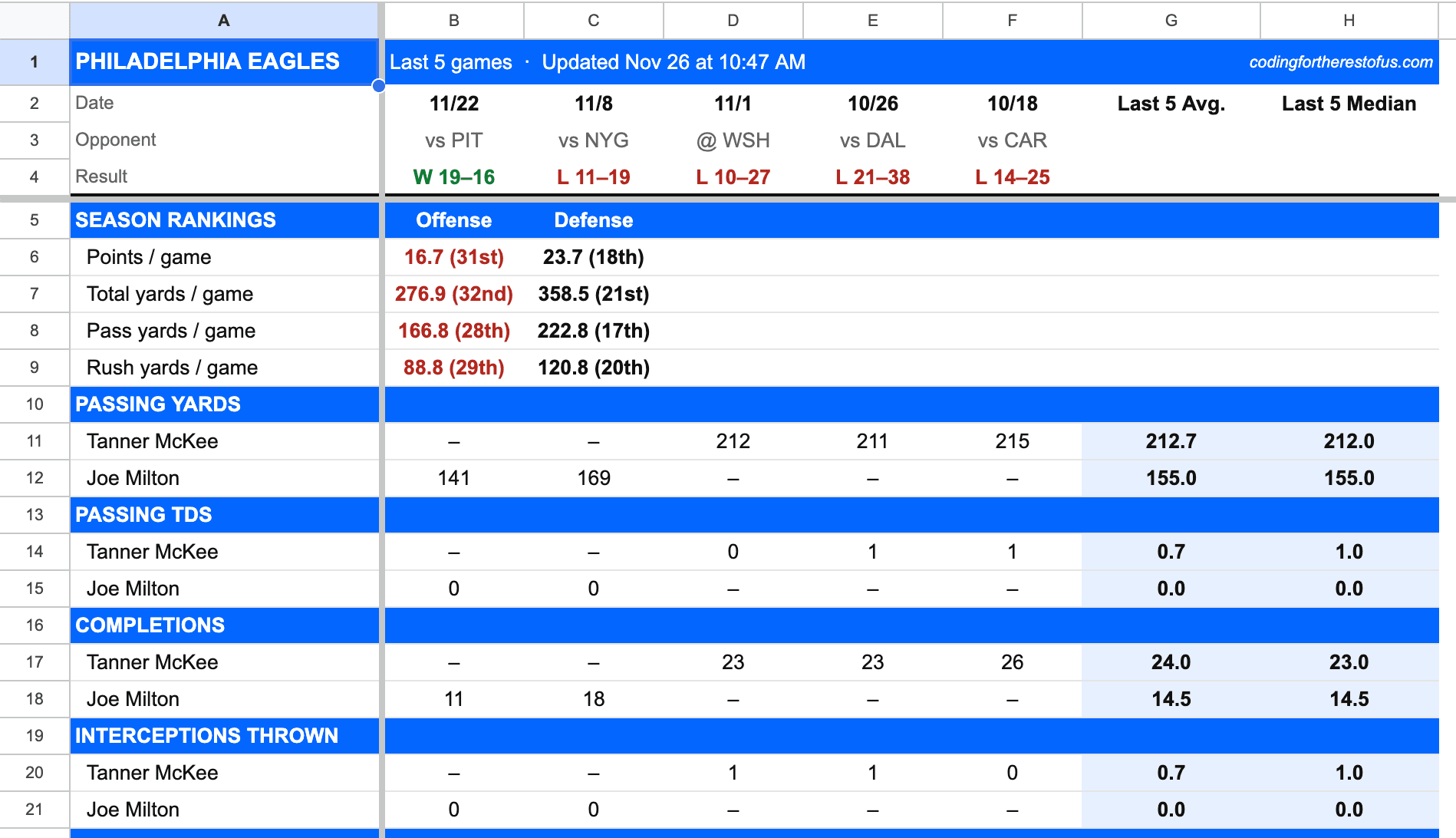
Read your results
Two new tabs appear, one per team. Season rankings sit at the top. Below them, stats are organized by metric with every player listed underneath. The last two columns show the Last 5 Average and Last 5 Median.
Troubleshooting
- "Run Setup first" error
- Open the NFL Tracker menu and click "Setup (run once)" before running statistics.
- "Unknown team" error
- Run Setup again. The team name must match the dropdown exactly.
- Sheet shows fewer than 5 games
- Early in the season a team may have played fewer than 5 games. Only completed games are shown.
- Scores show 0–0
- ESPN returned the game but scores weren't finalized yet. Wait a few minutes and refresh.
- Script times out
- A full run usually takes under a minute. If it times out, just run Statistics again. It re-fetches everything fresh.
- Stats showing "–" for a player
- The player did not record that stat in that game (did not play, or had no carries, catches, or tackles). Average and Median only count games with a number.
- How do the season rankings work?
- They are out of 32 teams, regular season to date. 1st is best: most gained on offense, fewest allowed on defense. Early in the season they move around a lot.
- No NFL Tracker menu on iPhone
- The Google Sheets app does not show custom menus. Tick "Refresh now" on the Setup tab instead. Run Setup once on a computer first.
Follow the NBA too?
The NBA tracker works the same way: the last 5 games for any two teams, with points, rebounds, assists, and more for every player.
Get the NBA tracker